For UK & EU Amazon sellers
Seller Central shows revenue. STK shows your profit.
See what you really made on every order and every SKU, after every Amazon fee, VAT on sales and on fees, and your cost of goods at what you actually paid for that batch. Not an average.
The problem
Your best seller might be the one losing you money
Revenue is the number Amazon puts in front of you, and it's always the big one. It doesn't take off your cost of goods, storage that triples in Q4, long-term storage, low-inventory fees, returns, or the VAT you owe on Amazon's own fees.
So sellers rebuild their profit in a spreadsheet every week, or they trust a tool that uses one average cost for every unit. When your supplier's price goes from £5 to £6 and you make £2 a unit, that average is enough to turn a product you should reorder into one you should drop, and you'd never see it.
And if you sell in the UK and the EU, VAT makes it worse. One seller moving to STK found his figures were about £6,000 a month apart from his old tool. The VAT wasn't being calculated properly.
How STK works it out
Every unit costed at what you paid for it
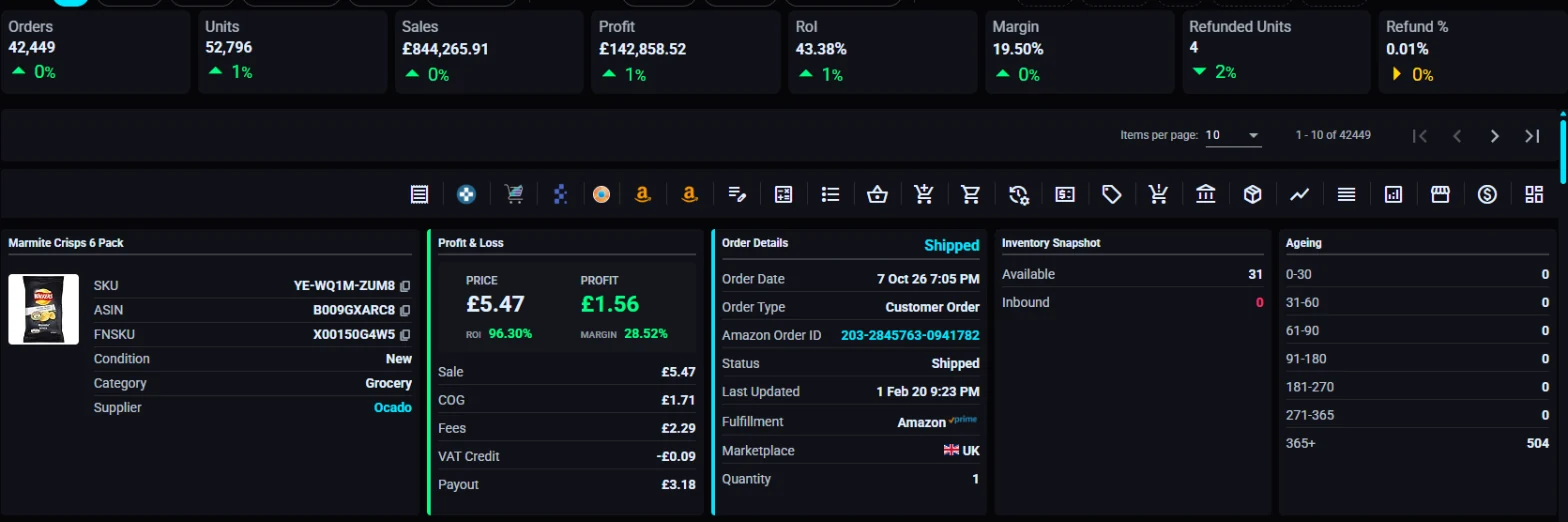
When you buy the same product in several batches at different prices, STK keeps them apart and costs each sale against the batch it came from, first in, first out. Then it takes off every Amazon fee and the VAT on both sides, order by order.
The result is a profit and loss for every single order: sale price, cost of goods, fees, VAT and what Amazon actually paid out.
What you get
The numbers you make decisions with
Profit per order and SKU
Know which products earn their place and which ones to stop reordering, by profit, ROI and margin.
VAT handled properly
VAT on sales and VAT on Amazon's fees, for UK and EU sellers, so your margin is the margin you keep.
Every marketplace, one P&L
UK and EU marketplaces in one view, or drill into each one on its own.
Every fee, not just two
Referral and fulfilment fees, storage, long-term storage, returns and the rest, all taken off where they belong.
Stock reconciled
Track every unit in and out of Amazon's warehouses and see where units have gone missing.
Reimbursements included
STK raises reimbursement cases for you with no commission, and the money shows up in your profit.
What sellers say
"I noticed my figures between the two… a discrepancy of like six grand a month"
Sean ran his account on another profit tool for years. When he connected STK, the two disagreed by about £6,000 a month. He dug in and found his old tool wasn't calculating his VAT properly. "STK do it automatically, perfectly," he says.
Sean's own account. Your figures depend on your products, marketplaces and VAT position.
“STK is the best P&L tool I worked with. Can't recommend it highly enough!”
Your free trial
See your own numbers in 14 days, free
Connect your Amazon account, upload your costs, and compare STK's figures with whatever you use today. Nothing is charged and no card is taken.
Then £32.99 a month for up to 10,000 orders a month. Your plan is set from your own order volume, so you're never on the wrong one.
What happens when you click
Two minutes to start
- Create your account. Email and password. No card.
- Connect Amazon. You sign in on Amazon's own page and approve access. We never see your Amazon password.
- STK pulls in your orders, fees and stock. Your dashboard fills in as the data arrives.
- Add your cost of goods by hand or from a spreadsheet, and your profit is worked out from there.
Questions sellers ask
Do I have to enter cost of goods for every batch?
Each batch you buy at a different price is a separate cost, because that is what makes the profit right. You can enter costs by hand or upload them from a spreadsheet.
How far back does STK pull my orders?
When you connect, STK downloads your order history from Amazon so your past profit can be worked out as well as your new orders.
Does it handle VAT for UK and EU marketplaces?
Yes. STK works out VAT on your sales and on Amazon's fees, for UK and EU marketplaces.
Do you sell FBM as well as FBA?
Yes, STK covers both FBA and FBM orders.
Is it safe to connect my Amazon account?
You connect through Amazon's own authorisation page, using Amazon's official Selling Partner API. We never see your Amazon password.
If I cancel, do I lose my data?
We keep your data for 8 days after you cancel, so you can come back without starting again.
P.S. Every reorder you place on a wrong margin is either profit you give away or a product you should have dropped. The trial costs nothing and takes two minutes, and you'll see your real profit on your own orders.